
The best AI music generators do not all solve the same problem. Some platforms create complete songs from text or lyrics, while others are designed to separate instruments, generate supporting stems, remix recordings, or master a finished production.
Before opening an AI tool, define the result you actually need:
- A complete song with vocals
- An instrumental background track
- A new arrangement built around an existing demo
- Separate vocals, drums, bass, and instruments
- A polished master for distribution
- Short music for a video, podcast, advertisement, or game
- A consistent collection of tracks for sonic branding
This distinction matters because a tool that creates a full song in seconds may provide less detailed production control than a platform built around stems and digital audio workstation workflows. Similarly, a mastering tool can improve a finished mix but cannot repair weak songwriting or an unclear arrangement.
A useful principle is:
Use AI to accelerate the stage that is slowing you down, while keeping human judgment responsible for the creative direction.
What Are AI Music Generators?
AI music generators are software platforms that use machine learning and generative models to create or transform musical material. Depending on the platform, users may provide a text prompt, lyrics, a chord progression, an uploaded recording, a reference track, or a genre template.
The output may include:
- Complete songs
- Instrumental tracks
- Synthetic vocals
- Melodies and chord progressions
- Individual stems
- Remixes and alternate arrangements
- Mastered audio
- Loops and background music
- MIDI data
- Lyrics or songwriting suggestions
The term AI music generator therefore covers more than one type of product. Some tools resemble automated composers, while others function as intelligent production assistants.
Three Main Types of AI Music Tools
Text-to-Song Generators
These platforms turn a written description or set of lyrics into a finished musical track. The user may specify genre, mood, instruments, vocal characteristics, tempo, structure, or lyrical theme.
Text-to-song tools are useful for generating demos, testing songwriting ideas, creating concept music, or producing short tracks for digital content. Their main advantage is speed, but the first output should usually be treated as a creative draft rather than the final artistic decision.
Stem-Based Production Tools
Stem-based platforms work with individual musical layers such as vocals, drums, bass, guitar, piano, or synthesizers. They may separate an existing mix or generate new instrumental parts that follow the timing, key, and chord progression of an uploaded recording.
This approach is especially valuable for musicians and producers who already have a song idea but need help expanding, rearranging, practicing, or remixing it.
AI Editing and Mastering Tools
Post-production tools analyze existing audio and help improve balance, loudness, frequency distribution, timing, pitch, or overall presentation. Some systems also provide reference mastering, allowing users to guide the final sound with another track.
These tools can make professional audio processes more accessible, but they cannot replace careful recording, arrangement, or mixing decisions. A master can enhance a strong mix, but it cannot fully hide poor source material.
MusicCreator, Moises, and Soundful: Different Tools for Different Workflows
MusicCreator: Fast Prompt-to-Song Creation
The MusicCreator is primarily designed for users who want to move quickly from an idea or lyric to a complete track. Its current toolset includes text-to-song generation, lyric creation, AI vocals, song covers, stem splitting, vocal removal, mastering, MIDI editing, audio-to-MIDI conversion, and other music-editing functions.
A user can enter a song concept, paste original lyrics, select a musical direction, and generate a track containing vocals, instrumentation, and mixing. This makes the platform practical for quick demos, background music, creator content, campaign concepts, and early songwriting exploration.
Commercial rights require careful attention. MusicCreator’s current pricing FAQ states that commercial rights are included with annual plans but not monthly plans, even though commercial-license labels also appear elsewhere across its plan presentation. Creators should review the current checkout terms and retain the relevant license documentation before releasing or monetizing a track.
Best for: Complete song concepts, vocal demos, lyric-to-song generation, fast branded music drafts, and creators without a detailed production setup.
Moises: AI-Assisted Production, Separation, and Mastering
Moises is better understood as a broad creative suite for musicians than as a simple one-click song generator. Its tools include customizable stem separation, chord detection, key and tempo adjustment, lyric transcription, metronome functions, mastering, and AI Studio.
Moises AI Studio can generate new instrumental stems that follow the timing and tonal direction of uploaded audio. Chord information can be added to help generated guitars, keyboards, bass, and other parts stay aligned with the intended harmony.
Its mastering system currently includes Auto, Advanced, and Reference modes. These provide different levels of control for beginners, experienced producers, and users who want to guide the result with a reference track.
Moises states that users retain rights in their uploaded content and, to the extent permitted by the applicable jurisdiction, the output they generate. Its terms prohibit repackaging outputs as sample libraries and state that user content and output are not used for AI training without permission.
Best for: Musicians with existing recordings, stem separation, arrangement development, backing tracks, remix preparation, practice, mixing support, and mastering.
Soundful: Template-Based Generation With Producer-Friendly Exports
Soundful uses a genre-and-template workflow. Users select a musical category and template, then generate a track for a particular project or mood. The company describes its system as human-aided AI that creates tracks from sounds sourced for its platform.
The platform is especially useful for content creators, businesses, agencies, and producers who need background music or a starting point that can be developed further. Higher plans can provide stems, MIDI, mixed WAV files, and direct Ableton project exports containing stems, MIDI, and arrangement markers.
Soundful’s licensing depends on the plan. Its Standard plan is intended for personal use and requires attribution. The Content Creator plan provides a non-exclusive, perpetual license for downloaded tracks, while Music Creator Plus provides exclusivity during an active subscription and offers an option to purchase full copyright for broader uses such as sublicensing or continued monetization after the subscription ends.
Best for: Video background music, podcasts, advertising, business content, genre-based instrumentals, DAW production, and creators who want stems or structured exports.
AI Music Generator Comparison
| Platform | Primary Strength | Typical Input | Main Output | Best User |
|---|---|---|---|---|
| MusicCreator | Fast complete-song generation | Text, lyrics, audio, or selected tools | Songs, vocals, stems, MIDI, and mastered audio | Songwriters, creators, and small brands |
| Moises | Human-led production and audio transformation | Existing audio, chords, or stems | Separated or generated stems, remixes, analysis, and masters | Musicians, producers, educators, and performers |
| Soundful | Template-driven production and licensing options | Genre and template selection | Instrumental tracks, loops, stems, MIDI, and Ableton projects | Content creators, brands, agencies, and producers |
No platform is universally superior. The best option depends on whether the user needs a finished song, production assistance, or licensed background music.
How to Choose an AI Music Generator
Choose According to the Starting Material
Use a prompt-based generator when you have a concept but no recording. Next Use a stem-based platform when you already have a vocal, melody, chord progression, or rough demo. Use mastering tools after the arrangement and mix are substantially complete.
Choose According to the Final Use
A personal experiment, commercial advertisement, streaming release, podcast, game, or client campaign may require different rights.
Before generating music for a paid project, confirm:
- Whether commercial use is included
- Whether the license is perpetual
- Whether the track is exclusive or non-exclusive
- Whether attribution is required
- Whether sublicensing is allowed
- Whether the music can be distributed through streaming services
- Whether the license remains valid after canceling a subscription
- Whether stems, samples, or isolated audio can be redistributed
- Whether the platform allows use in client work
A platform’s marketing phrase “royalty-free” does not automatically answer every licensing question.
Choose According to the Required Level of Control
A content creator may need a polished two-minute background track and little else. A producer may require isolated stems, MIDI, detailed arrangement control, and the ability to continue editing inside a DAW.
More automation is not always better. The correct tool is the one that provides enough control for the intended result without adding unnecessary complexity.
A Practical AI Music Production Workflow
Step 1: Write a Creative Brief
Describe the project before writing the prompt.
Include:
- Audience
- Emotional objective
- Genre or musical influence
- Tempo range
- Instrumentation
- Vocal or instrumental direction
- Duration
- Intended platform
- Commercial purpose
- Brand personality
For example, a premium coffee advertisement may need warm, rhythmic, modern music with organic percussion and no distracting vocals. A gaming trailer may require aggressive electronic tension, rapid transitions, and a dramatic final impact.
Step 2: Generate Several Directions
Do not rely on the first output. Produce several versions with controlled differences.
Change one variable at a time:
- Tempo
- Primary instrument
- Vocal style
- Energy level
- Harmonic mood
- Song structure
- Production density
This makes it easier to understand which musical element is improving or weakening the result.
Step 3: Select the Strongest Sections
One generated track may contain a strong chorus but weak verses. Another may have a better rhythm and less convincing melody.
Treat generated outputs as source material. Select, arrange, edit, combine, or recreate the strongest sections rather than accepting one complete result without review.
Step 4: Add Human Performance or Production
Human input can create more individuality through:
- Original vocals
- Live guitar, piano, percussion, or strings
- Rewritten melodies
- Revised lyrics
- Custom sound design
- New chord voicings
- Manual arrangement
- Mix decisions
- Creative effects
- Structural editing
Even small human contributions can make the track feel more connected to a specific artist or brand.
Step 5: Export Stems
When available, export separate vocals, drums, bass, and instrumental parts. Stems give the producer greater control over balance, arrangement, effects, transitions, and synchronization with video.
They also make it easier to create several campaign versions, such as:
- Full mix
- Instrumental version
- Fifteen-second advertisement
- Thirty-second social version
- Podcast introduction
- Looping background version
- Voice-over mix
Step 6: Mix and Master the Track
Balance the stems, remove unnecessary frequencies, control dynamics, and create enough space for vocals or spoken content.
Mastering should prepare the final mix for its intended distribution environment. A track for streaming may require a different practical approach from music placed quietly beneath dialogue in an advertisement.
Step 7: Verify Rights and Save Documentation
Save the prompt, generation date, source recordings, project files, platform plan, license certificate, edits, and final export.
This documentation can help demonstrate:
- Which material was created by the user
- Which sections came from AI output
- Which platform and plan were used
- Which human modifications were made
- Whether the project had commercial coverage
How to Write Better AI Music Prompts
A useful prompt should describe musical behavior, not only genre.
Use this formula:
Purpose + mood + tempo + instrumentation + structure + production style + vocal direction + duration + exclusions
Prompt Example for an Independent Artist
Create an atmospheric alternative-pop demo at approximately 105 BPM. Begin with sparse electric piano and soft electronic percussion, then build into a wide emotional chorus with layered synthesizers and live-sounding drums. Use an intimate female vocal with restrained verses and a stronger melodic hook in the chorus. Structure: intro, verse, pre-chorus, chorus, verse, chorus, bridge, final chorus. Avoid cheerful major-key melodies and excessive vocal runs.
First Prompt Example for Brand Advertising
Create a 30-second instrumental for a modern sustainable skincare brand. Use warm marimba, light hand percussion, soft bass, and subtle organic textures. The mood should feel clean, optimistic, natural, and premium. Build gently toward a memorable final logo moment. No vocals, no dramatic drops, and no aggressive electronic sounds.
Prompt Example for a Podcast
Generate a calm 20-second podcast introduction using muted piano, soft analog synthesizer, light percussion, and a simple four-note melodic identity. The sound should feel intelligent, approachable, and contemporary. Leave enough space for a spoken introduction and create a clean ending that can transition into dialogue.
Prompt Example for a Game Loop
Create a seamless 60-second cyberpunk exploration loop at 90 BPM. Use pulsing bass, distant industrial percussion, granular textures, and restrained synthetic melody. The track should create tension without becoming exhausting during repeated playback. No vocals and no final cadence that makes the loop obvious.
AI Music for Sonic Branding
AI music generators can help businesses explore a recognizable sound across advertisements, product videos, events, podcasts, websites, and social media.
A brand should not generate unrelated music for every campaign. It should define a repeatable sonic system containing elements such as:
- Tempo range
- Instrument family
- Rhythmic character
- Harmonic mood
- Vocal policy
- Production texture
- Short audio logo
- Intro and outro behavior
For example, a healthcare brand might use gentle piano, soft synthetic pads, restrained tempo, and clear tonal resolution. A gaming company could use sharper percussion, modular synthesizers, and short rhythmic signatures.
AI can generate variations around this system, but a human brand strategist should ensure the music remains consistent with the organization’s identity.
Copyright, Licensing, and Human Authorship
In the United States, the Copyright Office states that purely AI-generated material is not protected by copyright. Human-authored expression, creative arrangement, selection, or modification may still receive protection, and using AI as an assistive tool does not automatically prevent copyright protection for the human contribution. The analysis depends on the circumstances of each work, and prompts alone generally do not provide enough human control under current guidance.
This makes human involvement important for more than artistic quality. Writing original lyrics, recording performances, editing melodies, arranging sections, creating sound design, and making substantial production decisions can establish a clearer record of human creativity.
Platform ownership language should not be confused with copyright recognition under national law. A service may contractually allow a user to exploit an output even when the output itself receives limited copyright protection.
Creators should also use only recordings, compositions, samples, and voices they have permission to process. Technical access to voice-cloning or cover-generation features does not create permission to imitate an identifiable performer. The U.S. Copyright Office has identified unauthorized digital replicas, including realistic voice replicas, as a significant policy concern.
Jump to Recommended Fonts
Liquid Mirage Psychedelic Style Font | Dusty Express Rough Texture Font | Moctra Electro Font | Brick Slash Urban Graffiti Font | Grimthorn Hardcore Font | Static Youth Punk Font | Bold Rune Blackletter Font
AI can generate the sound, but typography helps audiences recognize the genre, artist, campaign, or content series before they press play. Use expressive music fonts for artist names, album titles, podcast covers, video thumbnails, digital releases, promotional graphics, and branded music campaigns.
1. Liquid Mirage Psychedelic Style Font
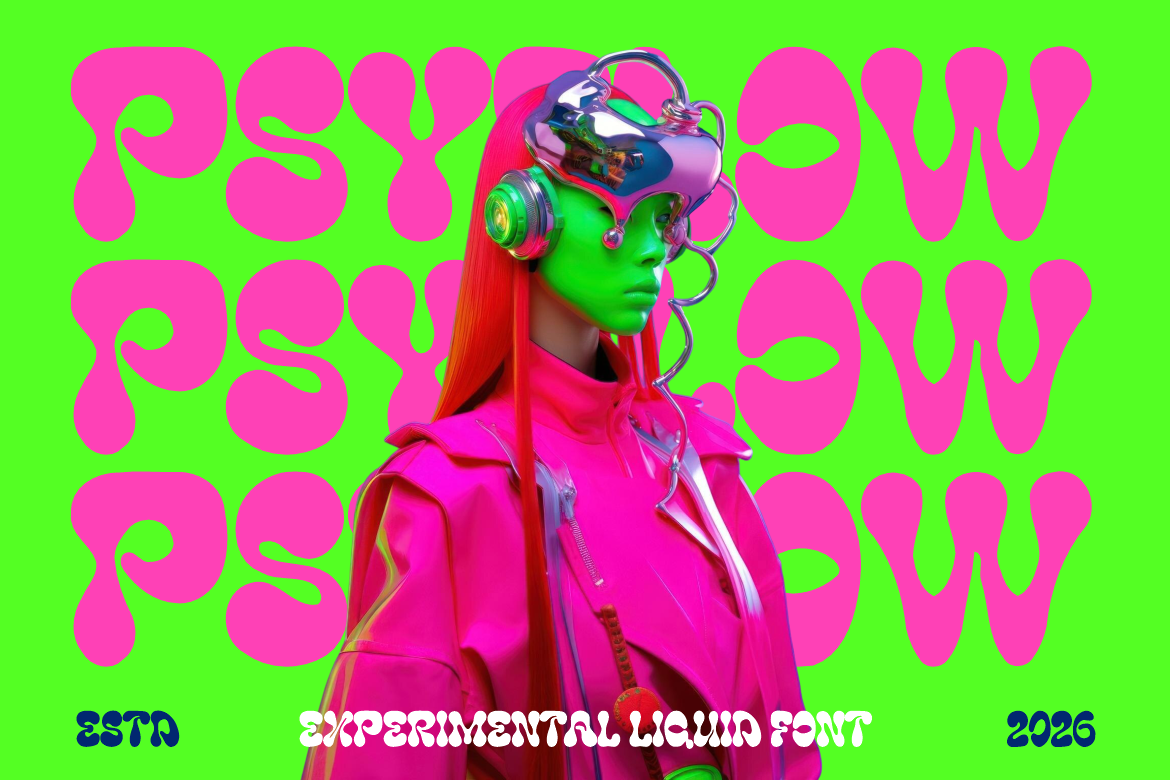
Liquid Mirage uses thick rounded strokes, melting curves, soft edges, and bulb-like terminals to create a flowing psychedelic rhythm. Its organic construction makes words feel animated even in a static composition, which can visually support AI music built around experimental textures, surreal melodies, or immersive sound. Use it for short titles where the letterforms can remain large and expressive.
PROS: Fluid movement, bold silhouette, distinctive psychedelic personality, and strong display impact.
BEST FOR: Experimental pop, psychedelic rock, neo-soul, jazz fusion, rave music, visualizers, album covers, and creative AI music projects.
2. Dusty Express Rough Texture Font
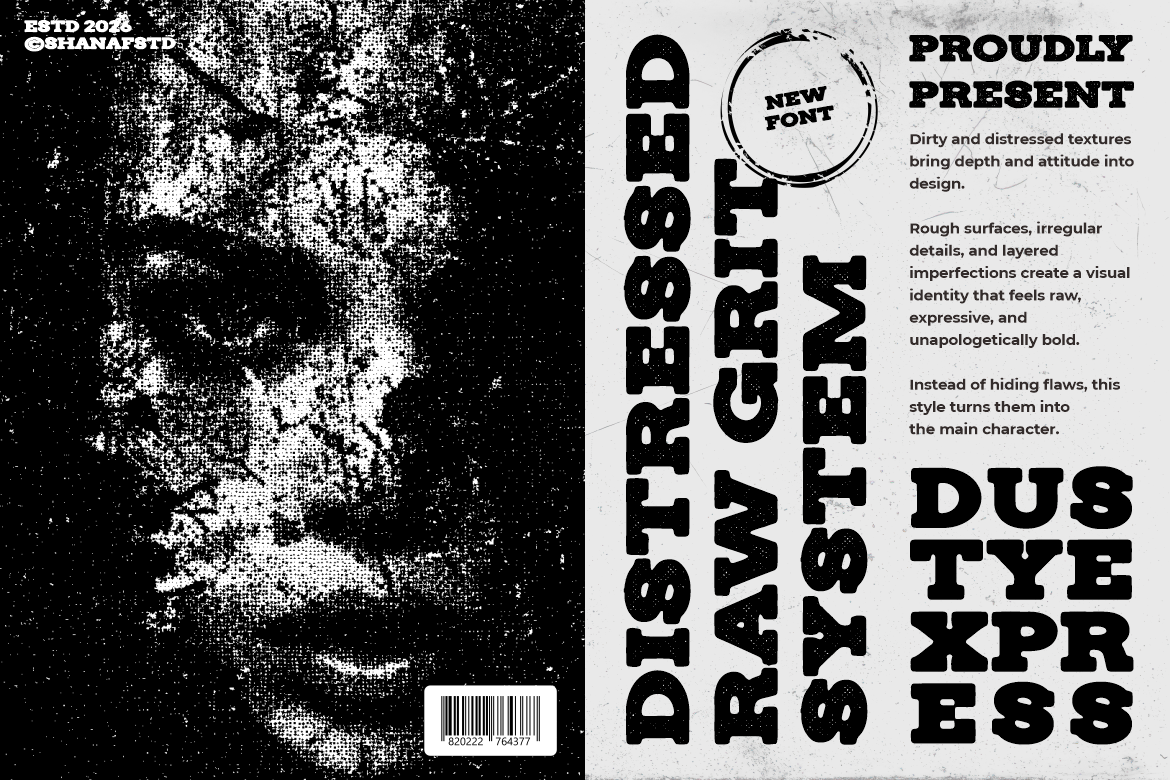
Dusty Express combines a wide, heavy slab-serif structure with rugged worn texture and pronounced terminals. The distressed surface creates an aged, physical quality without removing the underlying clarity of the letters. It is a strong option when AI-assisted music needs to feel handcrafted, roots-driven, vintage, or connected to traditional recording culture.
PROS: Rugged texture, strong readability, wide visual presence, and convincing heritage character.
BEST FOR: Blues, folk, Americana, country, garage rock, vintage podcasts, documentary music, and rustic album packaging.
3. Moctra Electro Font
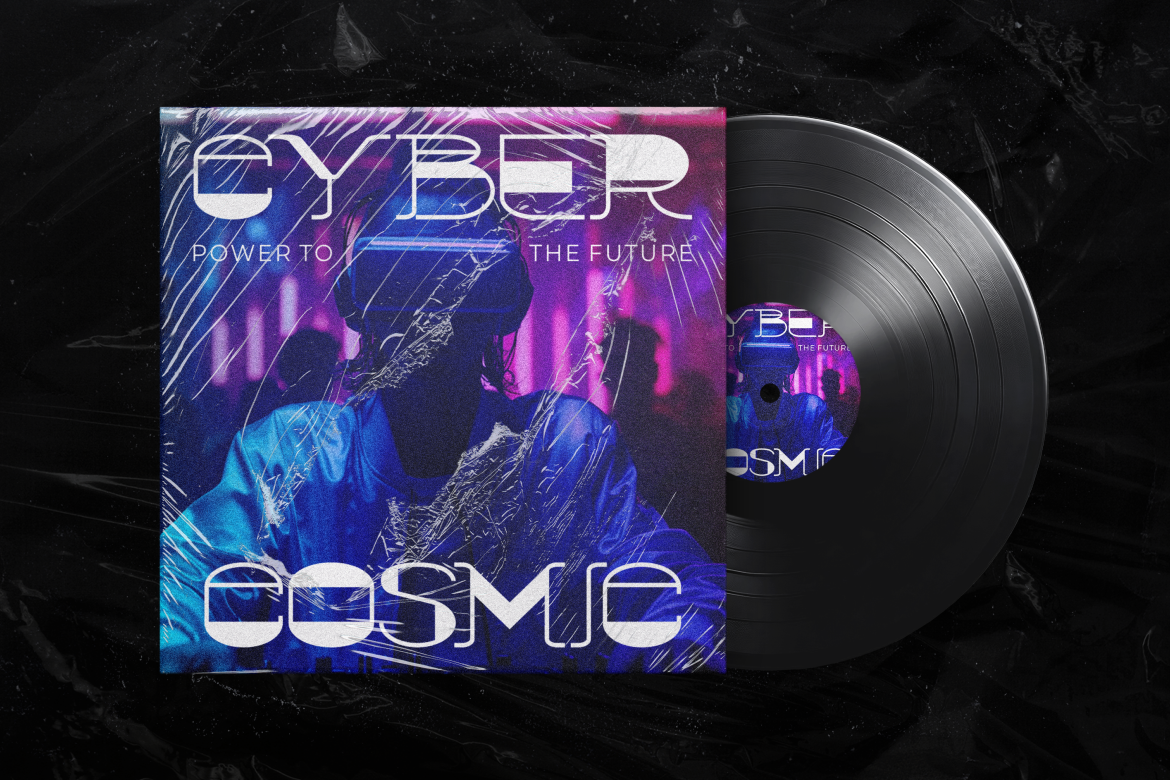
Moctra Electro features wide geometry, open cuts, solid forms, and thin inline details that produce a sharp electronic rhythm. Rounded corners soften the digital construction, while straight divisions preserve precision and energy. The design is especially effective for music generated around synthesizers, club environments, digital systems, or futuristic production.
PROS: Futuristic geometry, digital rhythm, strong logo visibility, and clear electronic personality.
BEST FOR: EDM, electro-pop, techno, synthwave, DJ identities, AI music platforms, club flyers, and streaming artwork.
4. Brick Slash Urban Graffiti Font

Brick Slash uses long angular strokes, pointed edges, stretched curves, and fast graffiti connections. Its changing stroke width creates a handwritten urban rhythm that feels energetic rather than mechanically typeset. It can give AI-assisted hip-hop, rap, and street-culture projects a more personal and expressive visual identity.
PROS: Dynamic movement, authentic graffiti energy, expressive connections, and memorable street character.
BEST FOR: Hip-hop, rap, breakdance, mixtapes, streetwear collaborations, urban podcasts, creator channels, and underground events.
5. Grimthorn Hardcore Font
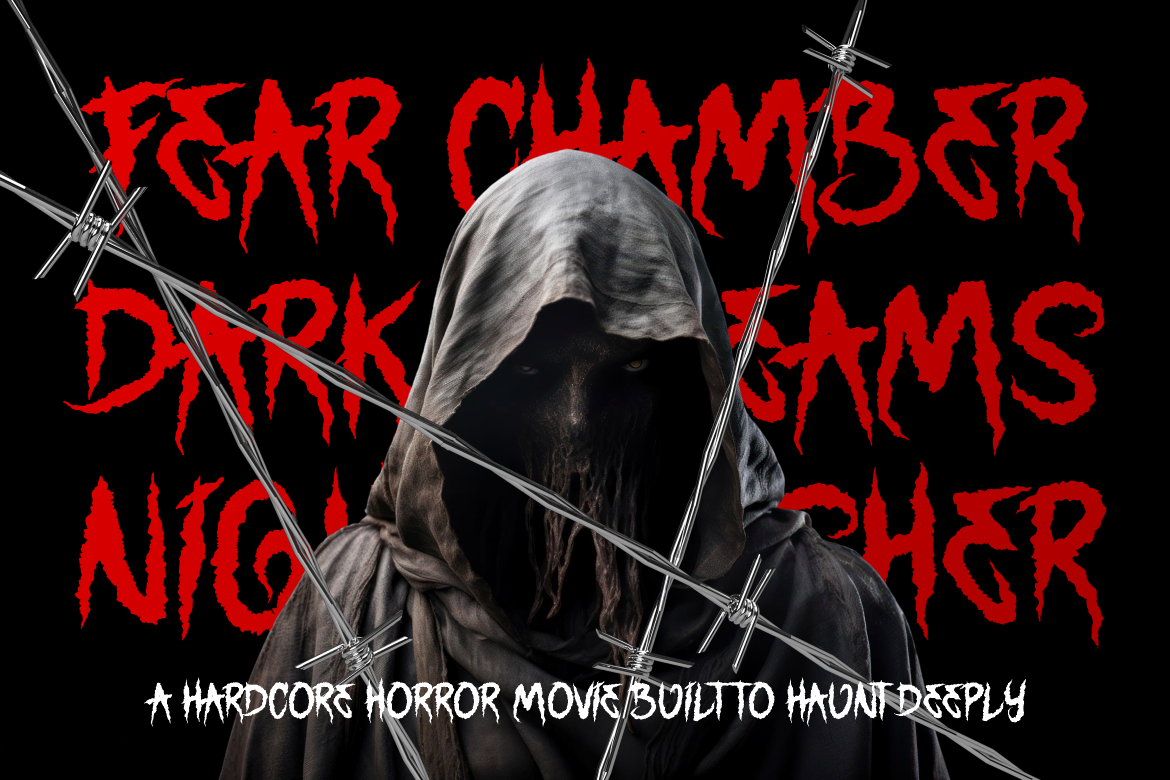
Grimthorn uses tall irregular characters, jagged contours, uneven strokes, and thorn-like extensions to create a hostile, handcrafted presence. Its structure combines Gothic influence with hardcore intensity while preserving enough recognition for major display titles. It is a compelling choice for dark AI music, extreme genre experiments, horror soundtracks, and aggressive visual campaigns.
PROS: Aggressive silhouette, intense texture, dark emotional character, and strong underground impact.
BEST FOR: Hardcore, metal, dark ambient, horror soundtracks, gaming music, thriller podcasts, festival graphics, and extreme album art.
6. Static Youth Punk Font
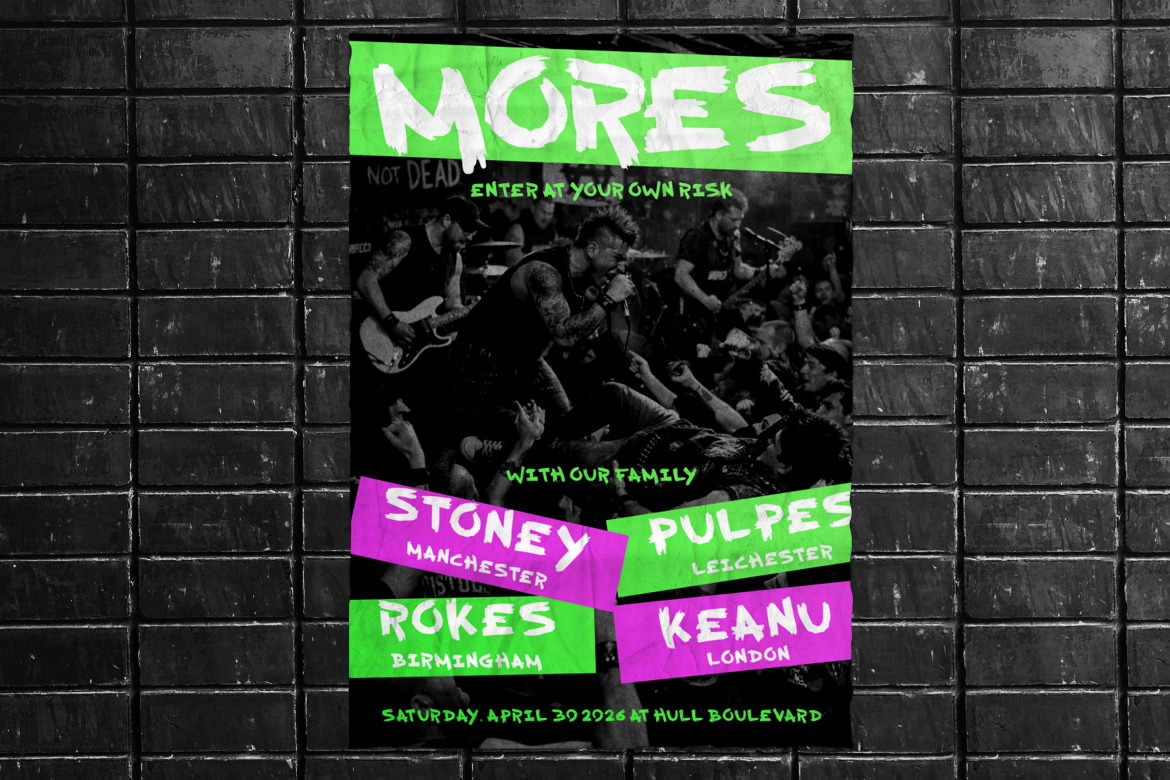
Static Youth uses rough dry-brush strokes, torn terminals, uneven edges, and shifting stroke widths to create raw DIY movement. Its deliberately anti-polished character can provide a human contrast to music created with highly automated production tools. The font is useful when a project should feel immediate, rebellious, independent, and physically handmade.
PROS: Raw brush texture, loud visual rhythm, authentic punk attitude, and high headline visibility.
BEST FOR: Punk, garage rock, grunge, protest music, independent labels, zines, concert posters, and DIY creator campaigns.
7. Bold Rune Blackletter Font
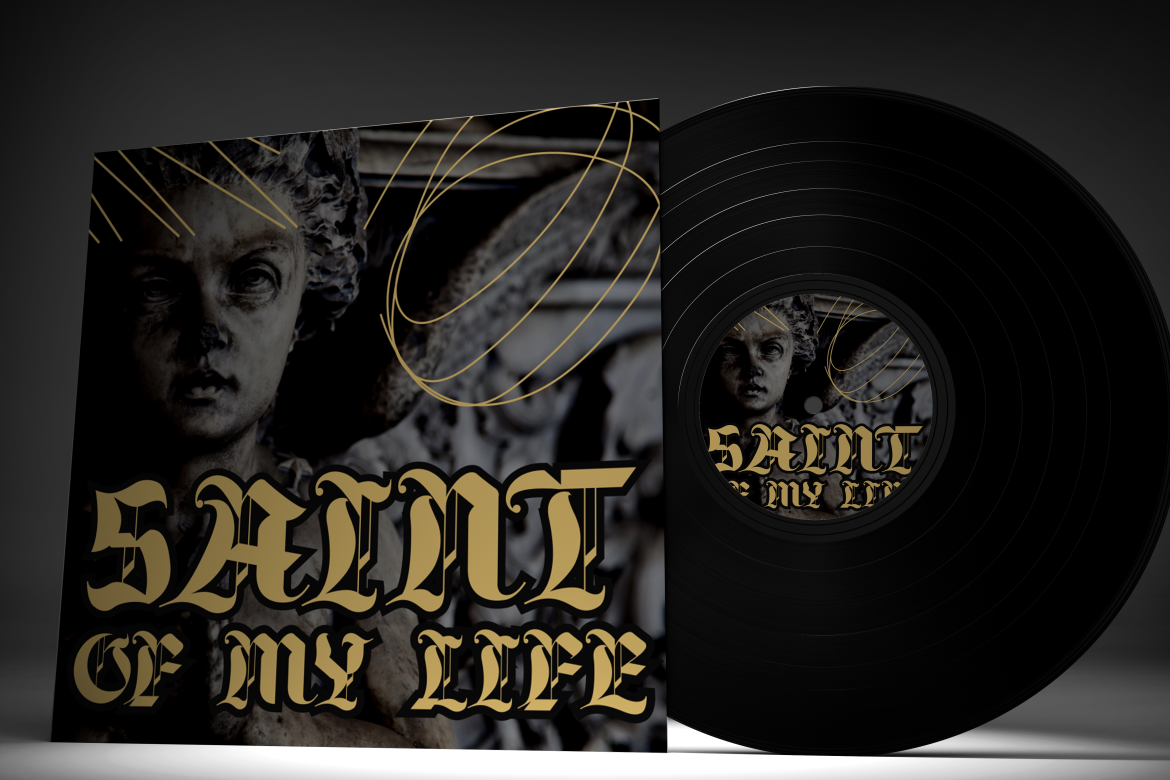
Bold Rune combines medieval blackletter influence with bold strokes, sharp serifs, intricate curves, and a more contemporary display balance. Regular and slanted styles give designers options for both ceremonial and faster-moving title treatments. Its dramatic personality can bring history, authority, ritual, and darkness to AI-generated music projects.
PROS: Regular and slanted styles, dramatic authority, balanced ornamentation, and strong Gothic recognition.
BEST FOR: Gothic rock, doom metal, dark folk, medieval soundtracks, fantasy games, tattoo culture, cinematic music, and alternative branding.
Comparison
| Font | Visual Personality | Best Music Direction | Strongest Branding Application |
| Liquid Mirage | Fluid, surreal, and psychedelic | Experimental, psych, fusion, and rave | Album covers and visualizers |
| Dusty Express | Rugged, vintage, and handcrafted | Folk, blues, Americana, and garage | Physical packaging and posters |
| Moctra Electro | Digital, futuristic, and energetic | EDM, techno, synthwave, and electro-pop | DJ logos and streaming graphics |
| Brick Slash | Urban, expressive, and rebellious | Hip-hop, rap, and street culture | Mixtapes and creator branding |
| Grimthorn | Dark, aggressive, and unsettling | Hardcore, metal, horror, and dark ambient | Band titles and game soundtracks |
| Static Youth | Raw, independent, and anti-polished | Punk, grunge, and garage rock | DIY posters and label campaigns |
| Bold Rune | Gothic, historical, and authoritative | Doom, dark folk, fantasy, and cinematic music | Dramatic logos and merchandise |
Common Mistakes When Using AI Music Generators
The first mistake is expecting one prompt to produce a release-ready track. AI can generate melodies, arrangements, lyrics, vocals, and polished audio quickly, but speed does not guarantee originality, emotional depth, or strategic relevance. Generate several directions, identify the strongest sections, and reshape them through human arrangement, performance, editing, sound design, and mixing. The most useful workflow treats AI as a collaborator that expands possibilities rather than an automatic replacement for musical judgment.
The second mistake is ignoring licensing differences between platforms and subscription plans. “Royalty-free,” “commercial use,” “exclusive,” and “copyright ownership” do not mean the same thing. A free plan may permit personal social content but prohibit monetization, while another plan may provide commercial use without exclusivity. Some licenses remain valid after cancellation, while others require an active subscription or a separate copyright purchase. Review the terms for the exact plan, save the license documentation, and confirm that uploaded songs, samples, vocals, and reference material are legally available for the intended use.
The final mistake is allowing automated sound and generic visual design to produce an identity that feels interchangeable. A complete track may still fail as branding when the music, artist name, album artwork, typography, video style, and audience message do not belong to the same creative world. Define the emotional direction first, then select a PutraCetol font that reinforces the genre and personality. Use the expressive typeface for titles and campaign moments, pair it with readable supporting typography, and maintain enough consistency for audiences to recognize the project across streaming platforms, posters, social media, videos, and merchandise.
Conclusion
AI music generators are making composition, production, remixing, and mastering more accessible to musicians, creators, businesses, and creative teams.
MusicCreator provides a fast path from ideas or lyrics to complete songs. Moises is particularly valuable for stem separation, arrangement development, practice, remixing, and mastering. Soundful offers template-based creation, producer-friendly exports, and licensing options for content and commercial workflows.
The strongest results come from choosing the platform according to the task. Begin with a clear brief, generate several alternatives, edit the strongest material, add meaningful human input, and verify the rights before publishing.
Visual identity should receive the same care as the sound. Liquid Mirage can express psychedelic experimentation, Dusty Express supports rugged authenticity, Moctra Electro communicates digital energy, Brick Slash adds urban movement, Grimthorn introduces extreme intensity, Static Youth brings punk rebellion, and Bold Rune delivers Gothic authority.
Fonts from PutraCetol Studio can help transform AI-generated audio into a more complete creative identity across album covers, videos, podcast graphics, artist logos, posters, merchandise, and branded campaigns.
AI may accelerate music creation, but human intention is what turns generated sound into a recognizable artistic or commercial voice.
Explore these fonts and many more at PutraCetol.com to build a business identity that looks professional, trustworthy, and memorable.
Additionally, if you want to explore some free typography options, you can check out Putracetol Studio on Dafont. Happy reading and designing!