
Digital interfaces are no longer judged only by how well they function. Today, users expect interfaces to feel intuitive, visually pleasing, and emotionally engaging. Typography plays a major role in shaping these experiences. Fonts influence how information is perceived, how easily users navigate menus, and how professional an interface feels.
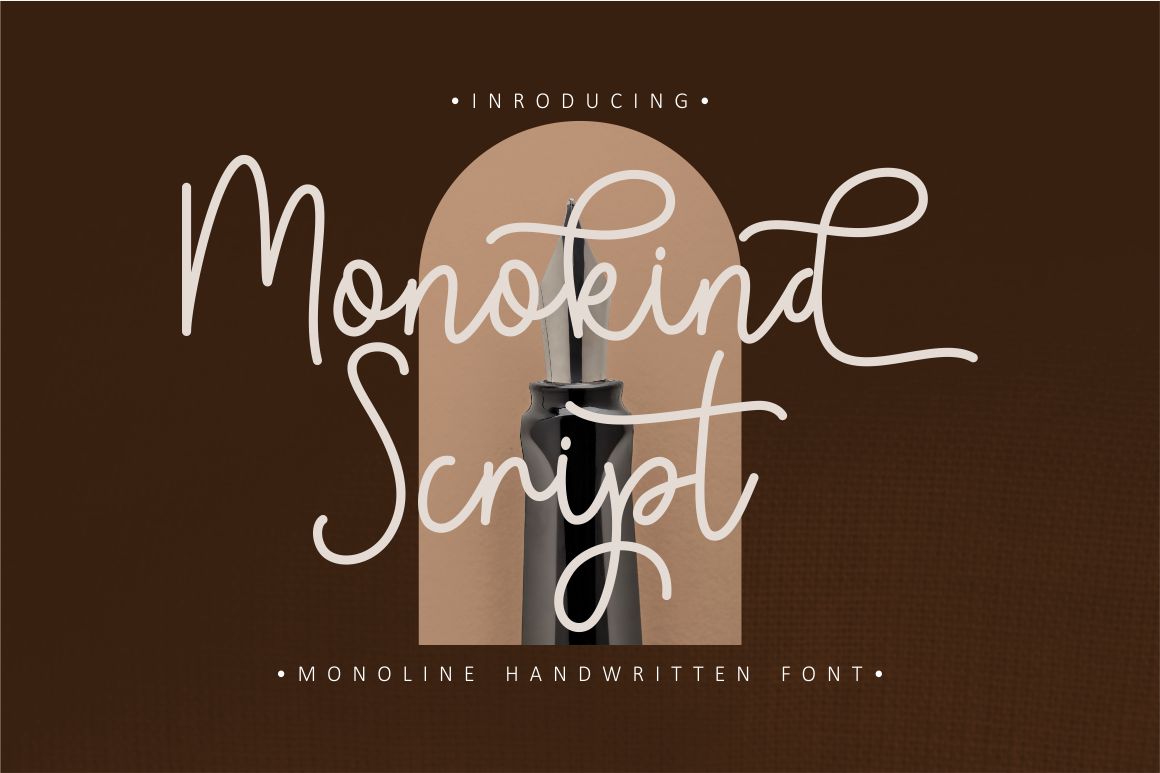
One typeface that offers both aesthetic charm and functional flexibility is Monokind Script. Known for its clean script style and ease of use, this font has become a practical option for designers working on gadget interfaces. From smartphones and tablets to desktop systems and applications, this font can add personality without sacrificing clarity.
This article explores two practical ideas for using Monokind Script font for gadget interfaces, focusing on how it can enhance visual appeal, improve usability, and support modern digital experiences.
Why Typography Matters in Gadget Interfaces
Before diving into usage ideas, it is important to understand why typography is so critical in gadget interface design.
Typography in digital interfaces:
- Shapes first impressions
- Affects readability and comprehension
- Guides navigation and user flow
- Reflects brand personality
- Influences emotional response
Unlike print design, gadget interfaces must adapt to different screen sizes, resolutions, and interaction methods. Fonts used in interfaces need to be legible, lightweight, and flexible. Decorative fonts that work well in posters or branding often fail in UI contexts. This is where Monokind Script stands out.
Understanding Monokind Script Font
Monokind Script is a modern script typeface designed to balance elegance and clarity. While script fonts are often associated with decorative or artistic use, this font is structured to remain readable even on digital screens.
Key characteristics of Monokind Script include:
- Smooth, flowing letterforms
- Clean strokes suitable for screens
- Balanced spacing for readability
- A modern yet friendly tone
These qualities make it a strong candidate for selective use in gadget interfaces, especially when paired with neutral sans-serif fonts for body text.
Idea 1: Beautifying Gadget Interfaces with Elegant Script Accents

Adding Personality Without Overwhelming the UI
The first and most effective way to use Monokind Script is as an accent font within gadget interfaces. Instead of applying it everywhere, designers can use it strategically to enhance specific elements.
Ideal UI elements for Monokind Script include:
- App headers or section titles
- Welcome screens or onboarding messages
- Feature highlights
- Widget titles
- Personalization labels
Using this font in these areas adds elegance and warmth, making interfaces feel more human and less mechanical.
Creating a Modern, Neat, and Professional Look
When applied correctly, Monokind Script can elevate the perceived quality of an interface. Many gadget interfaces rely heavily on neutral sans-serif fonts, which can sometimes feel cold or generic. Introducing a script font in moderation creates contrast and visual interest.
For example:
- A fitness app may use Monokind Script for motivational messages
- A productivity app can highlight custom workspace names with script accents
- A smart home dashboard can use it for room labels or user profiles
This approach maintains professionalism while adding character.
Supporting Brand Identity in Digital Products
Typography is a powerful branding tool. If a product or service emphasizes creativity, personalization, or elegance, This font can reinforce those values visually.
Using Monokind Script as part of a consistent UI typography system helps:
- Strengthen brand recognition
- Create emotional connection
- Differentiate the interface from competitors
When users see familiar typographic elements across devices, trust and comfort increase.
Idea 2: Enhancing Navigation and Functionality Through Visual Hierarchy
Improving Menu Clarity and User Flow
The second key idea focuses on functionality. Typography is not just decorative. It plays a crucial role in how users understand and navigate interfaces.
Monokind Script can be used to:
- Highlight primary menu categories
- Differentiate sections within complex interfaces
- Emphasize important actions or modes
By visually separating key elements, users can scan interfaces more efficiently.
Strengthening Visual Navigation
In gadget interfaces with multiple layers or features, visual hierarchy becomes essential. Monokind Script can act as a visual marker that signals importance or personalization.
Examples include:
- Using script font for user-created folders
- Highlighting favorite tools or shortcuts
- Marking premium or featured sections
This subtle differentiation helps users build mental maps of the interface, improving usability over time.
Enhancing Functional Understanding
Clear typography supports functional understanding. When labels and navigation elements are visually distinct, users spend less time searching and more time interacting.
Monokind Script contributes by:
- Drawing attention to key elements
- Reducing cognitive load
- Supporting intuitive interaction
This is especially valuable for apps designed for daily use, where efficiency and clarity are critical.
Key Advantages of Monokind Script for Digital Interfaces
Easy Integration Across Platforms
Monokind Script is designed to integrate smoothly into websites, applications, and operating systems. Designers can apply it without complex adjustments or heavy customization.
This ease of integration:
- Speeds up development
- Reduces technical issues
- Supports consistent deployment across devices
It fits well into modern UI workflows.
Lightweight and Performance-Friendly
Performance is a major concern in gadget design. Heavy fonts can slow down loading times and negatively impact user experience.
Monokind Script is lightweight, which means:
- Faster rendering on screens
- Minimal impact on performance
- Smooth interaction across devices
This makes it suitable even for mobile and low-resource environments.
Flexible for Different Design Needs
Despite being a script font, Monokind Script offers flexibility. It works well across different screen sizes and resolutions when used appropriately.
Designers can:
- Adjust size and spacing
- Combine it with sans-serif fonts
- Apply it selectively for maximum impact
This adaptability makes it useful for a wide range of digital products.
Accessible for Designers at All Levels
Monokind Script is not limited to advanced designers. Its clean structure and predictable behavior make it accessible to beginners while still offering enough character for professionals.
This accessibility encourages:
- Experimentation
- Learning through practice
- Creative confidence
Designers can focus on experience rather than technical complexity.
Best Practices for Using Script Fonts in Gadget Interfaces
While Monokind Script offers many benefits, best practices ensure optimal results.
Key recommendations include:
- Use script fonts sparingly
- Avoid long paragraphs in script
- Pair with readable sans-serif fonts
- Maintain sufficient contrast
- Test readability on multiple devices
These practices help preserve clarity and professionalism.
Combining Monokind Script with Other Fonts
Monokind Script performs best when paired thoughtfully. For example:
- Use a clean sans-serif font for body text
- Apply Monokind Script to headings or accents
- Maintain consistent spacing and alignment
This balance ensures visual harmony and functional clarity.
The Role of Putracetol.com in Font Accessibility
Putracetol.com provides curated font collections that support both creative exploration and practical design needs. Monokind Script is part of this approach, offering designers tools that are visually appealing and easy to use across platforms.
By offering accessible fonts, Putracetol.com helps designers:
- Improve interface quality
- Strengthen digital branding
- Create user-friendly experiences
Typography becomes a strategic design asset rather than an afterthought.
Conclusion
Using the Monokind Script font for gadget interfaces is not just about decoration. When applied thoughtfully, it enhances both aesthetics and usability. Through strategic use as accent typography and functional navigation support, Monokind Script helps designers create interfaces that are modern, professional, and intuitive.
With its lightweight structure, easy integration, and visual charm, Monokind Script from Putracetol.com allows designers to beautify digital screens while improving user experience. It proves that the right font choice can transform gadget interfaces into engaging, efficient, and memorable digital environments.
Thank you for taking the time to read this article. If you are looking for more great articles, feel free to visit Putracetol Blog
Additionally, if you want to explore some free typography options, you can check out Putracetol Studio on Dafont. Happy reading and designing!