

The most responsible approach to AI and digital accessibility is to let artificial intelligence accelerate repetitive work while people remain accountable for context, quality, and inclusion.
AI can help inspect large websites, identify recurring patterns, draft alternative text, generate captions, explain technical issues, and suggest code changes. However, an automated report cannot determine whether a complete user journey is genuinely understandable and operable.
W3C states that accessibility evaluation tools cannot check every accessibility requirement automatically. They may also produce false or misleading results, which means human judgment remains necessary. WCAG conformance itself is evaluated through a combination of automated testing and human review.
A better question is therefore not, “Can AI make this product accessible?” It is, “Which accessibility tasks can AI support, and where must people make the final decision?”
What AI and Digital Accessibility Actually Mean
Digital accessibility is the practice of making websites, applications, documents, media, and connected services usable by people with different visual, auditory, physical, speech, cognitive, language, learning, and neurological needs.
WCAG 2.2 remains the current W3C Recommendation for web-content accessibility. It organizes requirements around content being perceivable, operable, understandable, and robust, while acknowledging that no standard can address every need of every person with a disability.
AI can support this work through several technologies:
- Machine learning that recognizes patterns in images, speech, or interface behavior
- Computer vision that interprets visual content
- Speech recognition that produces captions and transcripts
- Natural-language processing that summarizes or restructures content
- Generative AI that drafts descriptions, explanations, or remediation suggestions
- Predictive systems that identify possible accessibility regressions
- Adaptive interfaces that respond to declared user preferences
Many products described as AI accessibility platforms combine these methods with deterministic accessibility rules. The distinction matters. Rule-based tests are repeatable for machine-testable conditions, while generative models are more useful for contextual suggestions but may produce inconsistent answers. W3C’s Accessibility Conformance Testing framework covers automated, semi-automated, and manual methods, showing that effective evaluation requires more than one testing approach.
Where AI Can Improve Digital Accessibility
1. Detecting Repeatable Accessibility Problems
Automated systems can examine thousands of pages or interface states much faster than a person can review them individually. They can flag issues such as missing accessible names, absent language attributes, invalid markup relationships, insufficient color contrast, blocked zoom, inaccessible form fields, and some keyboard-navigation failures.
AI can add another layer by grouping similar findings, identifying likely root causes, explaining technical rules in simpler language, and recommending which shared component should be repaired first.
For example, when the same unlabeled icon button appears on 200 pages, the most effective response is not to edit every page separately. The team should repair the design-system component that produced the problem.
W3C’s ACT Rules document testable procedures for issues including text alternatives, accessible names, contrast, zoom, language declarations, keyboard access, and visible focus. Some criteria have automated implementations, while others still require semi-automated or manual evaluation.
2. Drafting Alternative Text for Images
Computer vision and generative AI can produce an initial description of a photograph, illustration, product image, or diagram. This is particularly useful for ecommerce catalogs, publishing archives, educational libraries, and other systems containing large image collections.
The draft still needs contextual review. The same image may require different alternative text depending on its purpose. A photograph of a damaged package might be decorative in a blog article, evidence in a customer complaint, or an actionable product-condition record inside a warehouse system.
W3C guidance explains that alternative text should communicate an image’s purpose and meaning in its specific context. Decorative images may need an empty alt attribute, functional images should describe the action they initiate, and complex charts may require both a short identification and a longer text explanation.
AI should therefore draft the description, while a content owner decides whether the image is informative, decorative, functional, or complex.
3. Producing Captions and Transcripts
Speech recognition can create first-pass captions for videos, webinars, podcasts, training materials, product demonstrations, and customer-support recordings. It can also help identify speakers, divide transcripts into sections, and convert spoken content into searchable text.
This can reduce production time, but the output should be checked for names, technical vocabulary, numbers, accents, background speech, and timing. An incorrect word in an entertainment video may be inconvenient. An incorrect dosage, financial amount, legal term, or safety instruction can materially change the message.
Accessible media may require captions, descriptive transcripts, audio descriptions, and an accessible media player, depending on what the content communicates. AI can help prepare these assets, but it does not decide which alternatives are necessary for a particular video.
4. Making Written Content Easier to Understand
AI can suggest shorter sentences, explain technical language, expand abbreviations, create summaries, or produce a plain-language companion version of complex content.
This can help people with cognitive and learning disabilities, readers using a second language, and anyone trying to understand unfamiliar information. It may be useful for onboarding, educational materials, public services, support articles, and product instructions.
The original meaning must remain intact. In healthcare, finance, legal services, and education, simplification should be reviewed by a subject-matter expert. A clearer version should support the authoritative content rather than silently replace it.
W3C research on AI and accessibility identifies content descriptions and more accessible written communication as promising uses of AI, while also warning about inaccurate predictions and bias in training data.
5. Suggesting Design and Code Repairs
An AI assistant can explain why a component failed a test and suggest a possible repair. It might recommend associating a form label with its field, replacing a clickable div with a semantic button, adding a visible focus style, increasing contrast, or providing a keyboard alternative to drag-and-drop interaction.
This can make accessibility guidance easier to understand for designers and developers who are still learning. It can also reduce the time accessibility specialists spend repeatedly explaining common failures.
The recommendation must be inspected in context. Adding ARIA attributes to the wrong element can make an interface more confusing, and a code change that fixes one test may create another problem elsewhere.
AI should propose. The developer should verify the semantics, interaction behavior, browser support, and assistive-technology experience.
6. Integrating Accessibility Into CI/CD
Accessibility checks can run during development, before a change reaches production. A team can test components, templates, and important user journeys whenever code is committed.
AI can help summarize failures, connect related regressions, suggest likely owners, and explain how a new issue differs from an accepted baseline. This makes accessibility part of normal product quality rather than a separate audit conducted shortly before launch.
W3C’s evaluation-tool resources include tools that support APIs, automated test suites, and continuous-integration workflows. The ACT Rules Format 1.1 became a W3C Recommendation in February 2026, providing a shared format for automated, semi-automated, and manual accessibility test rules.
Automated checks should block clearly testable regressions, but they should not replace keyboard testing, screen-reader review, zoom and reflow testing, or user research.
A Human-Led AI Accessibility Workflow
A practical process assigns different responsibilities to AI, accessibility specialists, product teams, and users with disabilities.
| Project Stage | Useful AI Role | Human Responsibility |
|---|---|---|
| Research | Organize feedback and identify recurring themes | Involve people with disabilities and interpret their experiences |
| Design | Flag contrast, spacing, target-size, and component risks | Define inclusive interaction patterns and content hierarchy |
| Development | Scan code and suggest common repairs | Verify semantics, keyboard behavior, focus, and assistive technology |
| Content | Draft alt text, captions, summaries, and plain-language versions | Confirm purpose, accuracy, tone, and context |
| Quality assurance | Find regressions and prioritize recurring failures | Perform manual tests and evaluate complete journeys |
| Monitoring | Track recurring issues across releases | Assign ownership and decide what must be fixed first |
Establish the Accessibility Target
Define the standard and scope before evaluating the product. WCAG 2.2 Level AA is a common target, but the organization may also have platform-specific, contractual, procurement, or jurisdictional requirements.
Document which websites, applications, documents, media, third-party services, and customer journeys are included. An accessible marketing page does not compensate for an inaccessible checkout, authentication flow, learning activity, or account dashboard.
Build Accessibility Into the Design System
Buttons, forms, dialogs, navigation, notifications, tables, charts, and error patterns should be accessible before individual product teams reuse them.
AI can help inspect design tokens and component code, but ownership must remain clear. Designers should define visible states and content hierarchy. Developers should implement semantic behavior. Content teams should write understandable labels. Quality-assurance teams should test real interactions.
Combine Automated, Manual, and User Evaluation
Automated testing provides speed and repeatability. Manual expert review evaluates issues such as meaningful sequence, logical focus order, understandable instructions, appropriate alternative text, and predictable interactions.
Testing with people with disabilities reveals barriers that standards-based reviews may not expose. W3C recommends involving users with disabilities early and throughout projects, while also recognizing that user testing and standards conformance evaluation serve different purposes.
Document AI Decisions
Record which tool generated each suggestion, what data it processed, whether a person reviewed the result, and who approved the final change.
This becomes especially important when AI handles customer content, medical information, employee data, education records, or other sensitive material. NIST’s AI Risk Management Framework recommends defined human roles, documented risk processes, stakeholder feedback, and human intervention where an AI system cannot reliably detect or correct its own errors.
The AI Experience Must Also Be Accessible
A company can use AI to improve accessibility while accidentally building an inaccessible AI interface.
Make Every Core Action Keyboard Operable
Users should be able to reach the prompt field, attach content, submit a request, stop generation, review sources, copy a response, correct a result, and provide feedback without a mouse.
Avoid controls that depend entirely on dragging, hovering, swiping, or precisely selecting a small icon.
Communicate Generation Status Clearly
A visual animation alone should not communicate that the system is processing a request. Screen-reader users need an appropriate status message, but continuously announcing every generated token can become disruptive.
Communicate meaningful states such as “Generating response,” “Response complete,” “Upload failed,” or “Three accessibility suggestions found.”
Give Users Control Over Generated Changes
An AI remediation feature should show what it intends to change. Users should be able to compare the original and proposed versions, reject an individual suggestion, undo an action, and understand whether the modification affects content, styling, or functionality.
Automatic changes should not silently rewrite labels, navigation, alternative text, or page structure without review.
Make Confidence and Limitations Understandable
Do not present a suggestion as certain when the model is guessing. Use language such as “possible issue,” “draft description,” or “requires manual review” where appropriate.
A single accessibility score can be useful for tracking, but it should not imply that every user can complete every task successfully.
Support Multiple Ways to Interact
Text prompts are not suitable for every user. Depending on the product, consider speech input, keyboard shortcuts, structured controls, saved preferences, reusable commands, and direct navigation to common actions.
Personalization should remain optional and predictable. A user should not have to relearn the interface because an AI system rearranged controls without explicit permission.
Practical Examples of AI-Assisted Accessibility
Ecommerce Product Catalog
AI can draft alternative text for thousands of product photographs and identify images that lack descriptions. A merchandiser then reviews the text to ensure it distinguishes important details such as color, material, size, pattern, and product variation.
Decorative lifestyle images can be marked appropriately instead of receiving unnecessary descriptions.
SaaS Dashboard
Automated tests can inspect shared components during every release. AI can group repeated failures and identify that a single date-picker component is creating keyboard and label problems throughout the application.
A specialist then manually tests the repaired component with keyboard navigation, zoom, and screen-reader software.
Educational Platform
AI can generate captions, transcripts, lesson summaries, and simpler explanations. Educators verify terminology and learning outcomes, while students can choose the format that supports them without losing access to the original material.
Healthcare Portal
AI can detect missing labels and draft plain-language explanations, but medical instructions, test results, appointment details, and consent content require qualified review.
The organization should prioritize accuracy, privacy, predictable navigation, and reliable non-AI alternatives over maximum automation.
Jump to Recommended Fonts
Astro Techno Display Techno Font | Pulse Display Sci-Fi Techno Font | Quantum Sector Cyberpunk Techno Font | Cosmic Network Techno Font | Technoboard Circuit Board Font
Technology-focused typography can give an accessibility report, conference identity, AI product launch, or awareness campaign a memorable visual voice. These are expressive display fonts, so they should be used for large titles and branding rather than interface instructions, long paragraphs, form labels, or essential accessibility information.
1. Astro Techno Display Techno Font

Astro Techno uses segmented strokes and layered contours to create a clear sense of motion, rhythm, and digital construction. Its futuristic structure can make a short project name feel connected to intelligent systems, space technology, or next-generation product development. It is particularly effective for large campaign titles where the letter details have enough room to remain visible.
PROS: Segmented construction, dynamic rhythm, recognizable high-tech silhouette, and strong display impact.
BEST FOR: AI accessibility reports, inclusive-technology events, product launches, research presentations, innovation campaigns, and digital branding.
2. Pulse Display Sci-Fi Techno Font
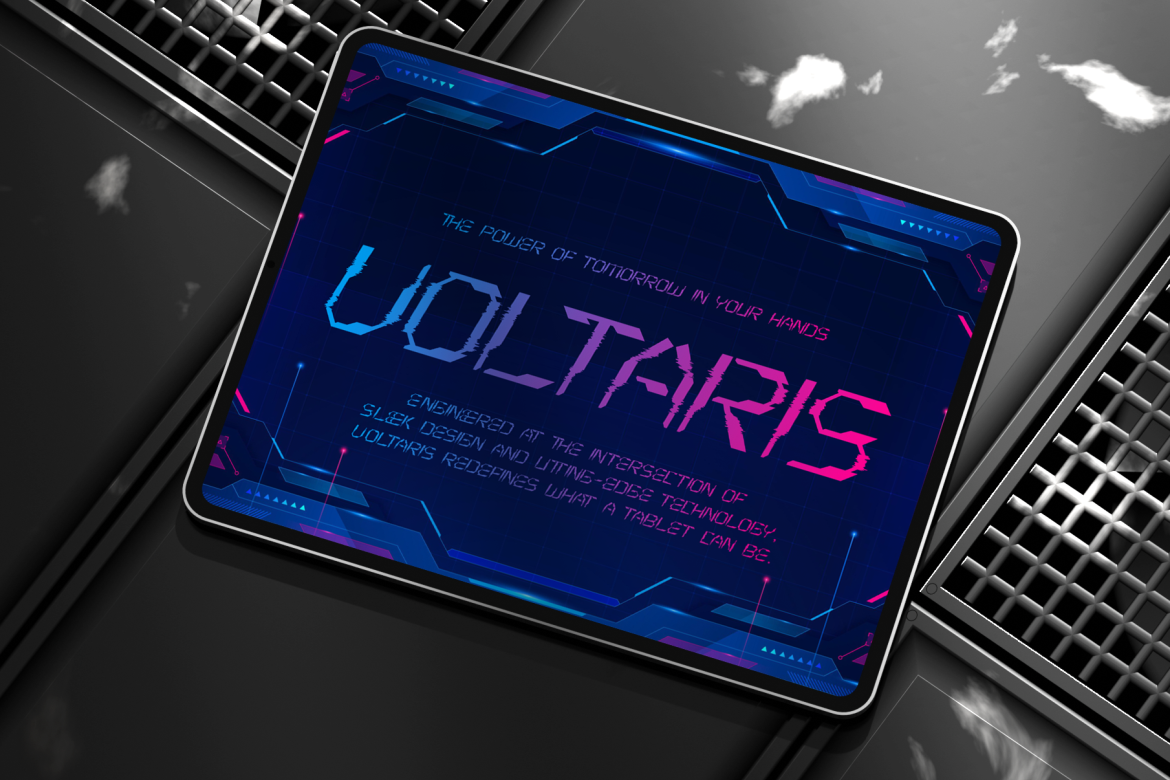
Pulse Display combines angular mechanical letterforms with pixel-like breaks and glitch-inspired distortion. Its visual rhythm resembles digital signals, giving headlines a cyberpunk atmosphere without requiring several additional effects. Use it selectively for project names and promotional graphics, then pair it with a highly readable sans serif for explanations and interface content.
PROS: Strong cyberpunk energy, angular precision, distinctive glitch details, and bold headline visibility.
BEST FOR: Accessibility hackathons, AI tools, gaming accessibility, technology exhibitions, film titles, and experimental digital campaigns.
3. Quantum Sector Cyberpunk Techno Font
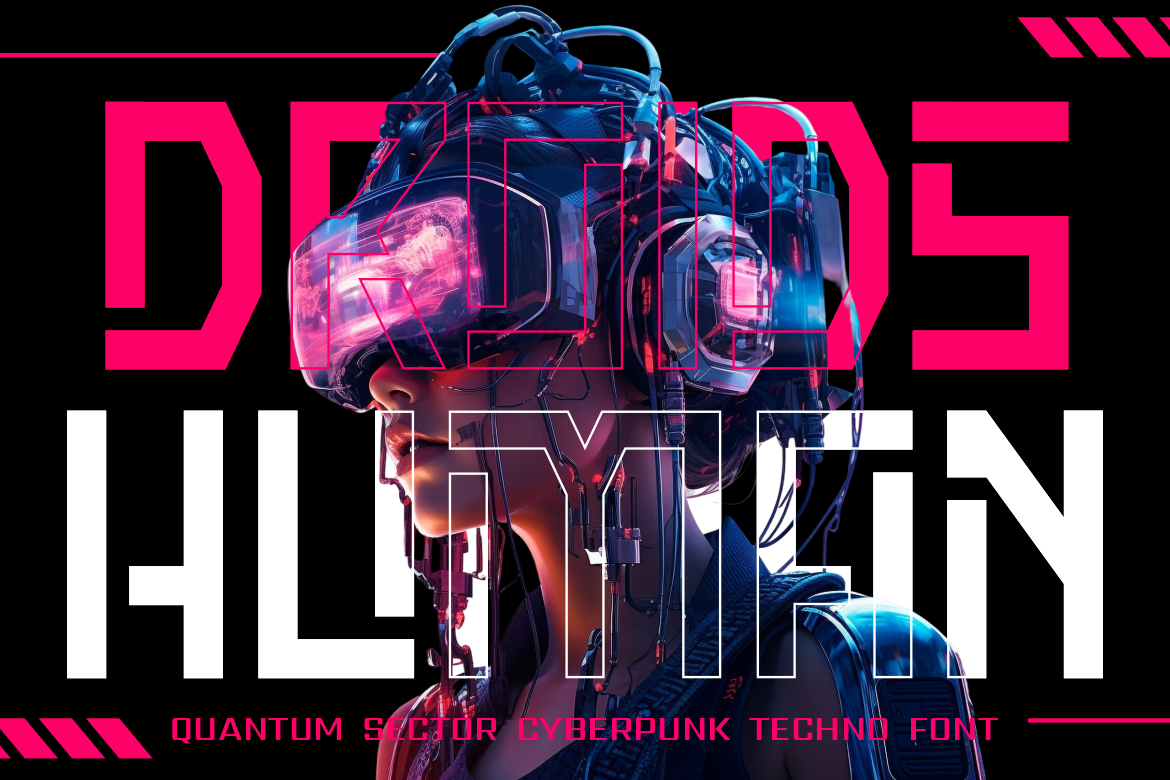
Quantum Sector features sharp cuts, geometric strokes, and digital styling that communicates engineering precision and futuristic energy. Its structured forms can give accessibility technology and AI product branding a more technical, performance-oriented personality. It works best in logos, dashboard covers, packaging, and short display text rather than small functional copy.
PROS: Sharp geometry, modern cyber character, strong technical identity, and memorable display structure.
BEST FOR: Assistive-technology products, AI startups, accessibility dashboards, gaming, futuristic packaging, and technology demonstrations.
4. Cosmic Network Techno Font

Cosmic Network combines sharp geometric lines with a monospaced, computer-inspired rhythm. Its organized structure feels appropriate for subjects involving data, networks, code, artificial intelligence, and connected systems. The typeface can bring order to a futuristic identity while still offering enough personality for prominent titles and branding.
PROS: Structured digital appearance, monospaced character, clear technological association, and flexible headline use.
BEST FOR: Data accessibility, AI graphics, network platforms, coding events, research publications, technology magazines, and digital interface campaigns.
5. Technoboard Circuit Board Font
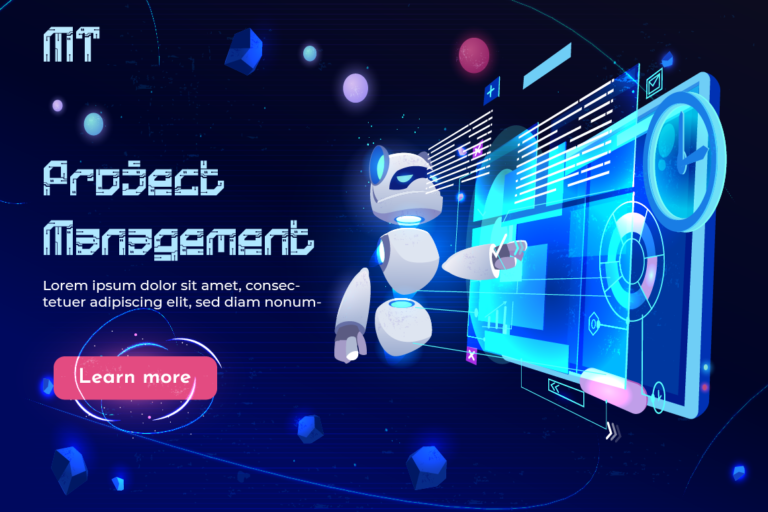
Technoboard draws its visual language from circuit boards and science-fiction interfaces. The connected mechanical details give logos and titles a clear engineering identity, while its uppercase, lowercase, number, punctuation, and multilingual support make it useful across broader campaign systems. It is a strong choice when accessibility is presented as an essential part of technical architecture rather than an optional add-on.
PROS: Circuit-inspired construction, broad character support, recognizable sci-fi personality, and strong engineering appeal.
BEST FOR: Developer tools, accessibility testing platforms, electronics, STEM campaigns, cybersecurity events, AI labs, and technical branding.
Comparison
| Font | Visual Personality | Strongest Accessibility Role | Ideal Creative Direction |
|---|---|---|---|
| Astro Techno | Segmented and dynamic | Innovation report titles | Future-focused and exploratory |
| Pulse Display | Glitchy and cyberpunk | Technology campaign headlines | Bold and experimental |
| Quantum Sector | Sharp and engineered | AI product identities | Technical and performance-driven |
| Cosmic Network | Structured and digital | Data and network communication | Organized and intelligent |
| Technoboard | Mechanical and circuit-inspired | Developer and testing-tool branding | Engineering-focused |
Common Mistakes
The first mistake is treating an AI-generated score or automated scan as proof that a product is accessible. A tool may confirm that every image has an alt attribute without determining whether the descriptions are useful. It may detect that a button has an accessible name without knowing whether the label explains the outcome. It may also miss an illogical focus order, confusing workflow, inaccessible support process, or interaction that causes cognitive overload. Automated findings should be treated as evidence within a larger evaluation, not as a compliance certificate. W3C explicitly states that tools assist accessibility evaluation but cannot determine accessibility by themselves.
The second mistake is publishing AI-generated alternative text, captions, simplified content, or code changes without contextual review. Generative systems can omit important details, invent information, reproduce bias, misunderstand technical language, or produce different answers for similar inputs. Teams should define which outputs require specialist approval, preserve the original content, protect sensitive data, and make corrections easy. Alternative text is especially dependent on purpose and context, while NIST guidance emphasizes clear human responsibility and additional oversight where AI risks require it.
The final mistake is trying to create inclusion without involving people with disabilities. A technically improved interface may still be exhausting, unpredictable, or difficult to understand in real use. Include disabled participants during research, prototyping, evaluation, and ongoing monitoring, then combine their experience with standards-based testing and technical expertise. The same restraint applies to visual branding: futuristic display fonts can make an accessibility campaign memorable, but they should not replace readable typography in navigation, forms, instructions, reports, or essential product content.
Conclusion
AI and digital accessibility can work together to make inclusive design faster, more consistent, and easier to integrate into everyday product development.
AI can scan large systems, identify repeated problems, draft alternative text, produce captions, explain technical failures, suggest repairs, and monitor accessibility regressions. These capabilities allow specialists to spend more time on complex journeys, contextual decisions, and user experience.
The technology should not be treated as an autonomous compliance system. Accessibility still requires human judgment, accountable ownership, manual evaluation, assistive-technology testing, and direct involvement from people with disabilities.
Design intent also matters. An organization can use advanced automation and still create exclusion if its team does not listen, test, and respond to real users.
Fonts from PutraCetol Studio can give inclusive-technology projects a clear visual identity. Astro Techno communicates dynamic innovation, Pulse Display adds digital energy, Quantum Sector suggests technical precision, Cosmic Network supports data-driven communication, and Technoboard connects accessibility with engineering infrastructure.
Used carefully alongside readable functional typography, these fonts can help AI accessibility reports, products, events, and campaigns look forward-thinking without compromising the clarity they are intended to promote.
Explore these fonts and many more at PutraCetol.com to build a business identity that looks professional, trustworthy, and memorable.
Additionally, if you want to explore some free typography options, you can check out Putracetol Studio on Dafont. Happy reading and designing!